
UV Setting on Air Purifier How to Use It Safely
You've just noticed a button marked UV, Germ, or a small lamp icon on your air purifier. The filter is already running, the room feels fresher, and now you're wondering whether leaving the UV setting on will improve protection, waste electricity, shorten lamp life, or create an ozone problem.
The practical answer is conditional. UV can add a disinfection layer, but it only works when the lamp delivers enough germicidal exposure to air moving through the unit. Airflow, exposure time, lamp condition, enclosure design, and filtration matter more than the illuminated button. In most homes, UV should supplement a properly sized filter and good ventilation, not replace them.
Table of Contents
- What the UV Setting Does Inside Your Air Purifier
- How to Find and Enable the UV Setting on Common Models
- Choosing the Right Operating Mode for Your Room and Routine
- Safety Precautions and Ozone Awareness When Using UV
- UV Lamp Care Cleaning and Replacement Made Simple
- Troubleshooting Common UV Setting Issues and Quick Fixes
What the UV Setting Does Inside Your Air Purifier
A purifier may show a UV, Germ, or lamp icon after you buy it for dust, allergies, smoke, or odors. The fan draws room air through the unit, while an enclosed germicidal lamp treats air moving through part of that path. The illuminated indicator confirms that the function is selected, not that every microorganism receives an effective dose.
HEPA filtration and UV perform different jobs. A filter captures particles in its media. UVGI, or ultraviolet germicidal irradiation, uses ultraviolet energy to damage or inactivate microorganisms exposed to the lamp. It does not collect dust, pollen, or smoke, and it cannot make up for a clogged filter or weak room circulation.
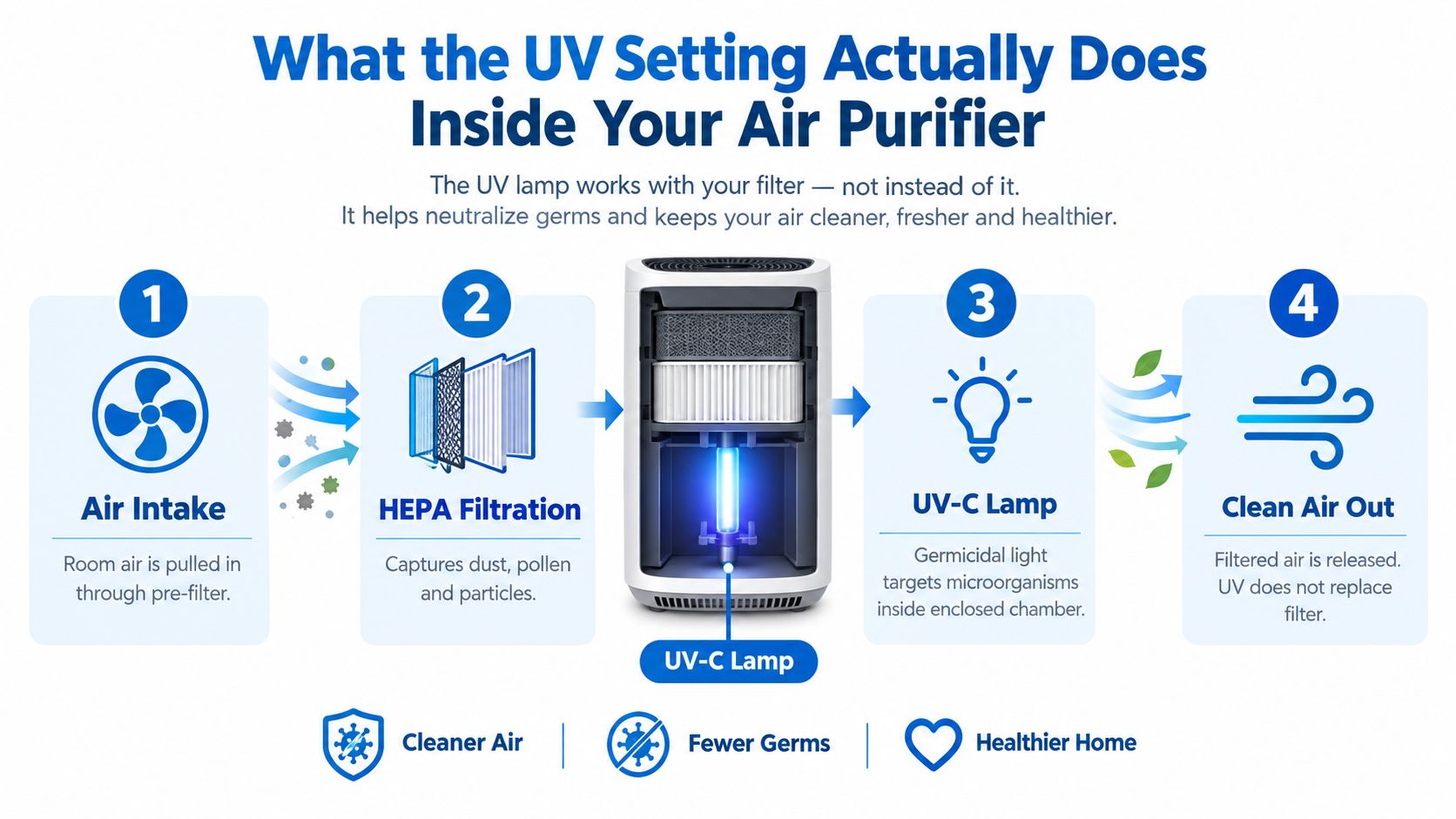
Why exposure time controls the result
The lamp's presence alone proves little. UV performance depends on dose, determined by irradiance and the time air remains in the treatment area. A fast fan pushing air through a short chamber gives each portion of air less exposure than a slower flow through a longer chamber. Lamp age, dust on the lamp or sleeve, and the chamber's internal design can reduce the delivered dose as well.
Leave UV on when the purifier has confirmed airflow, the lamp is clean and within its service life, and the manufacturer provides an enclosed treatment chamber. Turn it off when the lamp is overdue for replacement, the unit is being opened for service, or the setting adds no clear treatment value to a poorly designed airflow path. A UV indicator is not a substitute for checking those conditions.
Enclosed chambers and upper-room UVGI systems depend on geometry, air mixing, and exposure. The CDC describes GUV, also called UVGI, as a supplemental treatment for airborne organisms, including viruses, rather than a replacement for ventilation or particle filtration. Its guidance discusses UV-C in the 180 to 280 nanometre range, with 254 to 265 nanometres historically associated with strong germicidal action. CDC guidance on germicidal ultraviolet systems explains why design and safety controls matter.
Practical rule: A UV lamp in a short, high-flow chamber may add less value than a clean filter operating with effective room circulation.
UVGI has a long public-health history. Sunlight's bactericidal effect was noted in the 1870s, water disinfection with UV was demonstrated in 1877, and Niels Finsen received the Nobel Prize in 1903 for UV-based disease-treatment research. Air-disinfection work expanded in the 1930s and 1940s, including a 1941 to 1942 Philadelphia school study during a measles epidemic that found significantly lower infection among children in UVGI-equipped classrooms than in control classrooms. The principle is established, but consumer room purifiers don't automatically reproduce hospital or institutional system performance. Historical review of UVGI development and applications
For compatible EcoQuest equipment, replacement RCI cells and UV lamps should be matched to the model and the manufacturer's service instructions.
How to Find and Enable the UV Setting on Common Models
Start with the purifier powered on and the fan running. A UV lamp can't treat air that isn't being pulled through the chamber, so activating the light without confirming airflow creates a false sense that the system is working.
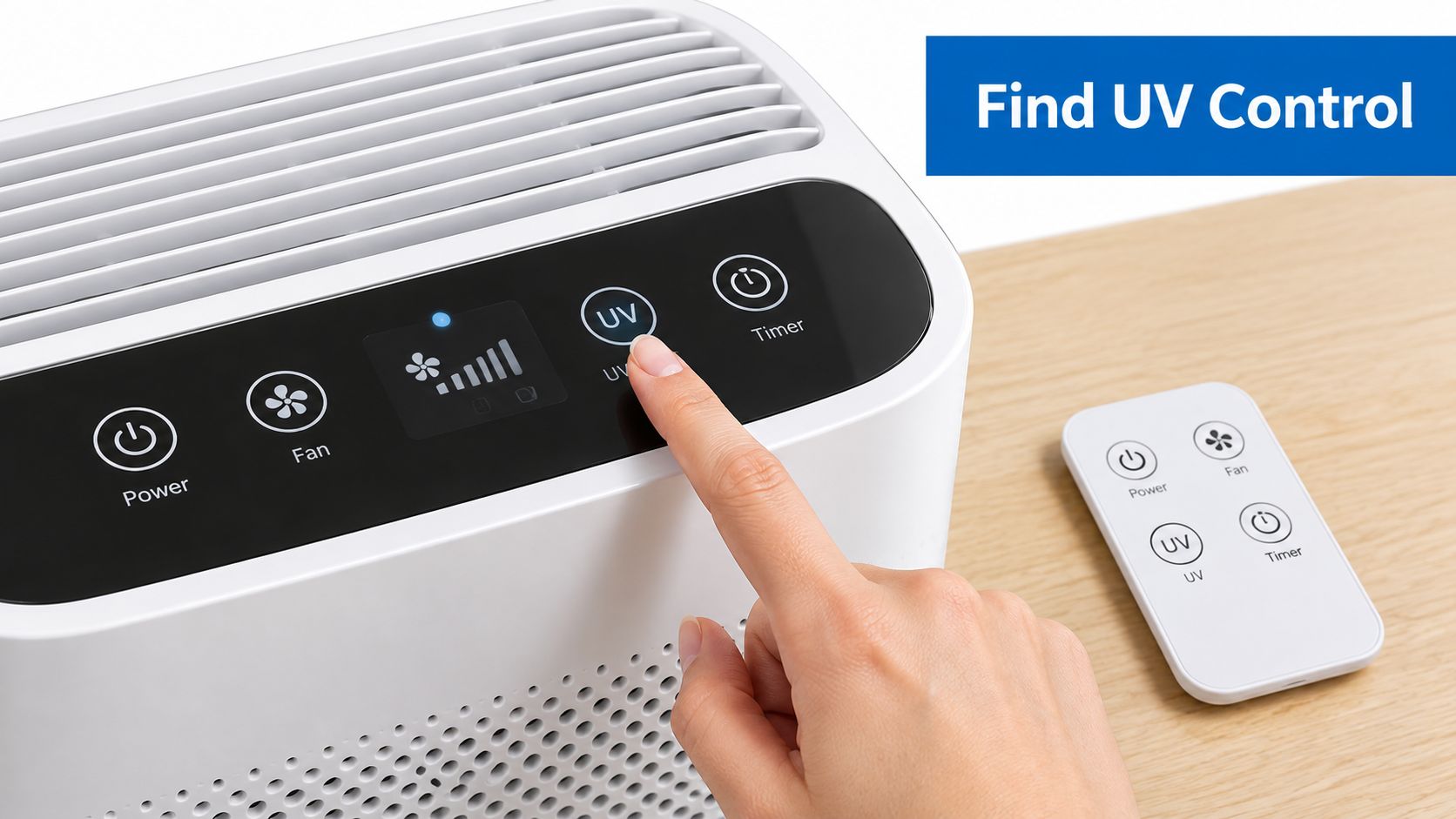
Use this universal activation sequence
- Turn on the purifier. Confirm that you can hear or feel the fan and that air is exiting the outlet.
- Choose a fan setting. Auto mode may adjust airflow based on a sensor, while manual modes let you choose a fixed speed.
- Find the UV control. Look for “UV,” “UV-C,” “Germ,” “Sterilize,” a lamp symbol, or a sanitation option inside the settings menu.
- Toggle the function once. Some models use a dedicated button. Others require a long press, a button combination, or a remote-control command.
- Confirm the indicator. The display may show a lamp icon, a status light, or a temporary message. The lamp itself should remain enclosed and invisible.
- Check the manual if nothing changes. Child lock, sleep mode, a maintenance warning, or a failed lamp can prevent activation.
A bedroom purifier may hide UV inside a night-mode menu because the manufacturer wants the fan and display to remain quiet. A living-room unit may place the control beside the fan-speed buttons. A portable car purifier can use a remote or a compact touch panel, but the same rule applies: verify air movement and an activation indicator before assuming UV is operating.
The Living Air Classic XL-15 Air Purifier is a filterless purifier that uses ionization and activated oxygen technology to help reduce airborne particles, odors, and stale indoor air in homes, offices, and other indoor environments. Its controls and technologies shouldn't be assumed to match a conventional HEPA-plus-UV appliance, so use the model-specific manual rather than relying on a generic UV procedure.
For a visual walkthrough of the control logic and enclosed-lamp concept, use the following video as a supplement to your owner's manual:
Never open the housing to confirm the lamp while the unit is powered. If the indicator says UV is active but the fan is stopped, the filter path is blocked, or a service light is illuminated, switch the function off and troubleshoot the underlying issue first.
Choosing the Right Operating Mode for Your Room and Routine
A purifier running in a bedroom overnight has different requirements from one treating a busy living room. Choose the UV schedule according to occupancy, airflow, noise, lamp age, and whether the unit can deliver air through its chamber at the intended rate. Keeping UV on continuously is useful only when those conditions support it.
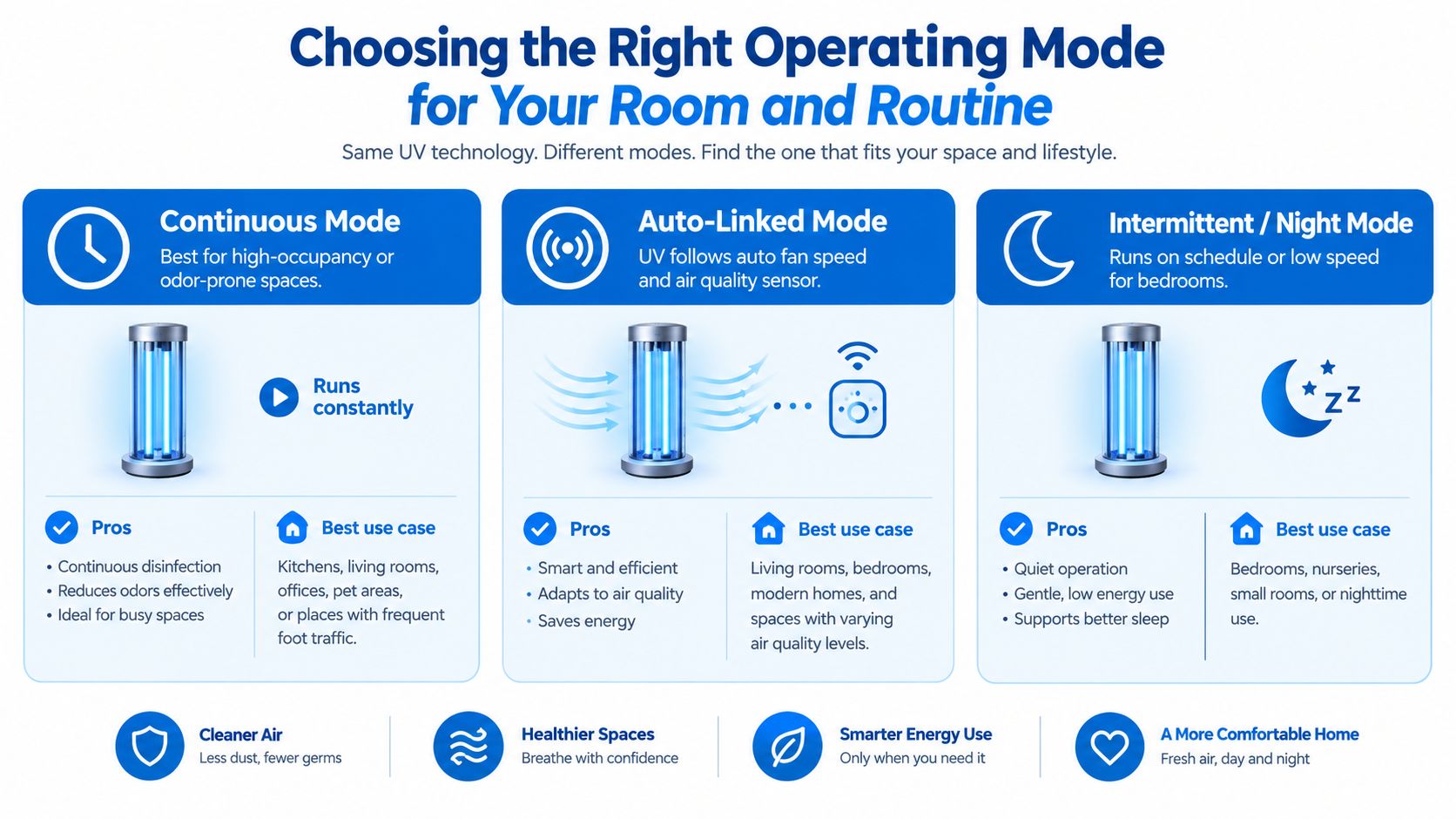
Match the setting to the room
Continuous mode suits a frequently occupied living area, a workspace with persistent odor sources, or any room where the purifier already runs for long periods. Expect more lamp hours, fan noise, energy use, and gradual lamp aging. As the lamp ages, its output can fall even though the indicator still shows UV operation, so continuous mode makes sense only with scheduled maintenance.
Auto-linked UV is usually the practical middle ground when the purifier ties UV operation to fan speed or an air-quality sensor. It can reduce unnecessary lamp runtime while preserving treatment during active airflow. A sensor may detect particles or volatile compounds, however, not viruses, bacteria, or fungi directly. UV will not compensate for a stopped fan or a blocked filter.
Intermittent or night mode fits bedrooms and other quiet spaces. It limits disturbance and lamp runtime, but also reduces cumulative UV exposure. Use it when overnight comfort matters most and the primary filter continues moving air effectively.
| Room Scenario | Recommended UV Mode | Airflow Tip |
|---|---|---|
| Frequently occupied living room | Continuous or auto-linked | Keep the purifier away from walls, curtains, and blocked outlets |
| Bedroom during sleep | Intermittent or night mode | Use the quietest fan speed that still moves air through the room |
| Odor-prone workspace | Continuous, if the unit is designed for it | Pair UV with the correct filtration or odor-control stage |
| Lightly used room | Auto-linked or scheduled | Don't run UV with the fan stopped |
| Small portable unit | Follow the manufacturer's fixed mode | Keep intake and exhaust clear inside the vehicle or room |
Airflow determines how much UV dose the passing air receives. A portable cleaner study found a 91% ± 7% reduction in viable airborne bacteria at low-UV settings, while also showing that performance changed with airflow. The tested prototype also combined filtration with UV, so its results do not represent every household purifier. Portable air-cleaner chamber study
Room-use rule: Leave UV on when the chamber is enclosed, the airflow path is clear, and the lamp is maintained. Turn it off when the purifier produces a concerning odor, has a safety problem, or needs filter and airflow service first. A newer lamp on a clean, correctly sized airflow path is more useful than maximum runtime on a neglected unit.
Safety Precautions and Ozone Awareness When Using UV
A UV-C lamp belongs inside a closed purifier housing. Direct exposure can irritate eyes and skin, so never remove a cover, defeat a safety interlock, or look into an operating lamp. If the housing is cracked, warped, loose, or missing a panel, unplug the unit and stop using UV until the damage is inspected.
The overlooked concern is ozone. Some UV modules can produce small amounts, depending on lamp design and operating conditions. A carbon stage does not automatically make ozone safe. Its performance can vary with humidity and other conditions, so treat the manufacturer's emissions information as more important than a general filter claim.
Make the safety decision from the device documentation
Check the manual and product labeling for ozone emissions, certification, lamp wavelength, and whether the UV chamber is sealed. Leave UV off if the documentation is unclear, especially in an occupied bedroom or a home with asthma or other respiratory sensitivities. Products that promote ozone generation as a cleaning benefit require a separate level of caution and should not run casually around people.
Airflow also affects the practical value of UV. A lamp receives less useful exposure when dust restricts the path, the fan moves air too quickly for the chamber design, or the lamp has aged. Use UV only when the purifier is moving air normally and the enclosure is intact. Turn it off while a filter blockage, fan fault, or other airflow problem is being addressed.
A sharp electrical or bleach-like odor after enabling UV is a warning to investigate. Switch the feature off, ventilate the room, and consult the manual. Odor cannot measure concentration reliably, but it should not be ignored. For a separate odor-removal situation involving specialized treatment, trust Eagle Restoration for odor removal and keep occupants, pets, and plants out of any area treated with ozone.
The EPA treats UV products that claim to kill or suppress microorganisms as pesticidal devices, rather than ordinary consumer products. UV works best as a supplemental layer with filtration and ventilation, not as a reason to neglect either one.
Equipment intended specifically to generate ozone, including commercial ozone generators, belongs in controlled, unoccupied treatment procedures.
Safety boundary: Leave UV on only with a sealed housing, normal airflow, and clear device documentation. Turn it off for unexplained odor, damaged parts, or any condition that could expose occupants to UV or ozone.
UV Lamp Care Cleaning and Replacement Made Simple
A UV lamp can still glow while delivering less useful germicidal output. Dust on the lamp sleeve blocks energy, and lamp aging reduces the dose available to the airstream. Treat the lamp as a maintenance component, not a permanent light source.
Before touching anything, switch the purifier off, unplug it, and allow the lamp and surrounding parts to cool. Follow the manual's access procedure, especially if the unit has an interlock or a ballast module. Never service an exposed lamp while power remains connected.
A maintenance routine that prevents guesswork
- Check the service indicator. Some units track lamp runtime or show a replacement warning. Reset the timer only after installing the correct replacement.
- Inspect the sleeve and chamber. Dust, film, and residue reduce transmission. Clean only with the materials specified by the manufacturer.
- Handle the bulb carefully. Avoid fingerprints on the glass, because oils can create hot spots or leave residue when the lamp operates.
- Confirm seating. A lamp that isn't fully inserted may fail to start or may not sit correctly in the designed exposure zone.
- Record the service date. A simple note on the purifier or in a household maintenance log helps when you have multiple units.
Lamp replacement intervals vary by model and operating schedule, so don't invent a universal calendar. Use the manufacturer's runtime guidance, replacement indicator, or service documentation. If the lamp has been exposed to heavy dust, smoke, or oily cooking residue, inspect it sooner.
A sensible workflow is to inspect the UV section when you replace or clean the main filter, while remembering that a filterless purifier follows a different maintenance plan. Store a compatible spare in its protective packaging, away from moisture and impact. For compatible equipment, Living Water II and III UV lamps provide a model-specific replacement reference, but the part must match your appliance exactly.
The strongest maintenance check is functional rather than visual. Confirm that the fan moves air, the UV indicator responds, the lamp is correctly seated, and the housing closes fully. If any of those checks fail, leave UV off until the issue is resolved.
Troubleshooting Common UV Setting Issues and Quick Fixes
When UV appears ineffective, check airflow and service condition before repeatedly pressing the control. A lit indicator confirms the control circuit responded. It does not confirm that the lamp is clean, correctly positioned, producing its intended output, or receiving enough air exposure.
The indicator won't turn on
Check the child lock, sleep mode, remote batteries, and maintenance warning. Confirm that the fan runs. Some purifiers disable UV when airflow stops or the access panel is not latched. If the indicator remains off after these checks, leave UV off and follow the model's service instructions.
The room still smells
UV does not remove every odor. Check for a working carbon or other odor-control stage, confirm that the odor source remains in the room, and verify that air is circulating through the purifier. Damp materials, smoke residue, drains, pets, and building materials can all sustain odors. Removing the source usually matters more than extending lamp runtime.
Noise increases when UV is enabled
UV may be linked to a higher fan speed or automatic mode. Move the purifier away from walls and curtains, clear the intake, and test a lower manual fan speed if the manual allows it. A higher speed can increase air changes, but it also reduces contact time through the UV chamber, so the quietest or fastest setting is not automatically the most effective.
Performance falls despite a glowing lamp
Inspect lamp age, sleeve cleanliness, seating, filter loading, and recirculation. The chamber study discussed earlier found that bacterial reduction depended on the interaction between UV exposure and air movement. A bright lamp cannot compensate for poor airflow through the treatment zone, a blocked filter, or a dirty sleeve.
Portable UV cleaners have shown substantial reductions under tested conditions, but results vary by equipment and operating conditions. A Canadian evidence summary reported estimated portable UVGI-only effectiveness ranging from about 30% to 90%, while noting uncertainty and limited ability to separate UV's contribution from filtration. Canadian evidence summary on UVGI
Before leaving UV on, verify the fan runs, the airflow path is clear, the lamp is maintained, and the housing is sealed. Keep UV off if the unit exposes the lamp, produces an unexplained odor, repeatedly trips a fault, or fails a basic check. These signs can indicate a damaged housing, control fault, airflow problem, or ozone concern. Contact the manufacturer or a qualified service provider rather than continuing to operate it.
EcoQuest Purifiers offers air-quality equipment, replacement parts, UV lamps, RCI cells, manuals, and repair support for compatible indoor-air systems. Visit EcoQuest Purifiers to match a UV component or purifier to your model before turning the setting back on.